
With the rise of remote work, many individuals have found themselves working from improvised home offices. While this newfound flexibility has its perks, it also comes with its fair share of challenges. One of the most significant challenges faced by remote workers is the lack of proper ergonomic setup. Without the guidance and resources of a traditional office environment, finding cost-effective ergonomic solutions can seem like an overwhelming task. However, with a little creativity and resourcefulness, it is possible to create a comfortable and productive workspace without breaking the bank.
Assessing Your Workspace Needs
Before diving into the world of ergonomic solutions, it is essential to assess your workspace needs. Take a moment to evaluate your current setup and identify any areas of discomfort or strain. Are you experiencing back pain from sitting for extended periods? Do you find yourself squinting at your computer screen due to poor lighting? Understanding your specific needs will help you prioritize which ergonomic solutions will be most beneficial and cost-effective for you.
Choosing the Right Chair
One of the most crucial elements of an ergonomic workspace is a comfortable chair. However, you don’t have to spend a fortune on a high-end office chair to achieve optimal comfort. Look for chairs that offer adjustable height and lumbar support. Many affordable options on the market today provide these features without the hefty price tag. Additionally, consider utilizing a lumbar support cushion if your current chair does not provide sufficient support.
Optimizing Your Desk Setup
A well-designed desk setup can make a world of difference in your overall comfort and productivity. When it comes to ergonomics, the height of your desk is key. Ideally, your desk should be at a height that allows your forearms to rest comfortably parallel to the ground while typing. If your desk is too high or too low, consider adjusting its height using risers or blocks. Alternatively, you can explore standing desk converters, which allow you to switch between sitting and standing positions throughout the day.
Investing in Proper Lighting
Inadequate lighting can strain your eyes and cause headaches, leading to decreased productivity. Fortunately, there are cost-effective ways to improve your workspace lighting. Natural light is always the best option, so try positioning your desk near a window if possible. If natural light is limited, invest in a desk lamp with adjustable brightness levels to reduce eye strain. Additionally, consider using warm or cool light bulbs, depending on your personal preference.
Prioritizing Keyboard and Mouse Ergonomics
For those who spend hours typing away at a computer, proper keyboard and mouse ergonomics are crucial. Look for keyboards that offer a comfortable and natural wrist position, such as ergonomic split keyboards or those with built-in wrist rests. Similarly, ergonomic mouse options are available in various shapes and sizes to accommodate different hand sizes and grip styles. These ergonomic accessories are often reasonably priced and can alleviate strain on your wrists and hands.
Creating a Comfortable Work Environment
In addition to the physical aspects of ergonomics, it’s important to create a comfortable work environment. Pay attention to the temperature and humidity levels in your workspace. Avoid extreme temperatures and consider using a humidifier or dehumidifier to maintain a comfortable atmosphere. Additionally, incorporate elements that promote relaxation and reduce stress, such as plants, calming scents, or soothing background music.
Start with the Biggest Improvements
Creating an ergonomic workspace doesn’t require replacing all of your furniture at once.
Instead, prioritize the changes that have the greatest impact on comfort and productivity.
Many remote workers notice immediate improvements after making just a few affordable upgrades, such as:
- Raising the monitor to eye level
- Using an external keyboard and mouse
- Adding lumbar support
- Improving desk lighting
- Adjusting chair height
Small adjustments often deliver surprisingly large benefits.
How to Keep Your Digital Life Organized?
Raise Your Monitor Without Buying a New Desk
Your monitor should be positioned so the top of the screen is approximately at eye level.
Instead of purchasing an expensive monitor arm, consider inexpensive alternatives such as:
- Monitor risers
- Laptop stands
- Adjustable shelves
- Sturdy storage boxes
- Books (used safely and securely)
Proper monitor placement helps reduce neck and shoulder strain during long work sessions.
Don’t Forget About Foot Support
If your chair is adjusted correctly but your feet no longer rest comfortably on the floor, a footrest can improve posture.
Affordable options include:
- Adjustable footrests
- Wooden foot platforms
- Foam foot cushions
Even a sturdy box can provide temporary support until you decide to purchase a dedicated footrest.
External Accessories Improve Laptop Ergonomics
Working directly on a laptop for hours often forces users into poor posture.
A simple combination of:
- Laptop stand
- External keyboard
- External mouse
can dramatically improve ergonomics while remaining relatively inexpensive.
This setup allows the screen to sit at eye level while keeping your wrists in a comfortable typing position.
Schedule Movement Throughout the Day
Even the most ergonomic workstation cannot eliminate the health risks associated with sitting all day.
Try to:
- Stand up every 30–60 minutes.
- Stretch your shoulders and neck.
- Walk for a few minutes.
- Change sitting positions regularly.
- Rest your eyes using the 20-20-20 rule (every 20 minutes, look at something about 20 feet away for 20 seconds).
Frequent movement supports circulation, reduces muscle stiffness, and helps maintain concentration.
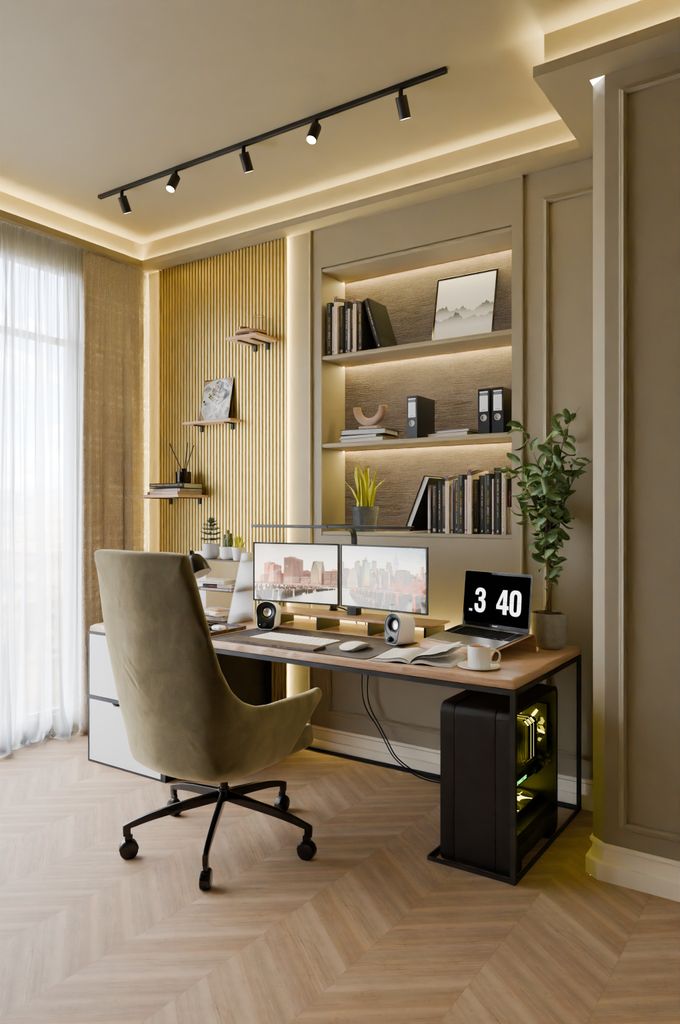
Reduce Cable Clutter
An organized workspace contributes to both comfort and productivity.
Simple cable management solutions include:
- Reusable cable ties
- Cable clips
- Under-desk trays
- Cable sleeves
Keeping cables organized creates more usable desk space and reduces distractions.
Improve Video Meeting Comfort
Remote workers spend more time on video calls than ever before.
A few inexpensive upgrades can improve both comfort and professionalism:
- Position your webcam at eye level.
- Use a small LED desk lamp for better lighting.
- Choose a comfortable headset with a built-in microphone.
- Keep your background clean and uncluttered.
These adjustments improve communication while reducing awkward viewing angles.
How to Make Your Home Office Smart on a Budget?
Avoid Common Ergonomic Mistakes
Many people unknowingly create unhealthy workspaces.
Common mistakes include:
- Working from a couch every day.
- Using a dining chair without support.
- Placing the monitor too low.
- Sitting too close to the screen.
- Ignoring wrist position.
- Working in poor lighting.
- Sitting for hours without taking breaks.
Correcting these habits often costs little or nothing.
Build Your Workspace Gradually
You don’t need to purchase everything immediately.
A practical upgrade order might look like this:
- Improve chair support.
- Raise the monitor.
- Add an external keyboard and mouse.
- Upgrade desk lighting.
- Improve cable management.
- Add a footrest.
- Consider a sit-stand desk or converter.
Gradual improvements make ergonomic upgrades much more affordable.
Final Thoughts
Creating an ergonomic home office doesn’t require expensive furniture or professional office equipment. Many of the most effective improvements involve thoughtful adjustments, affordable accessories, and healthier work habits.
By focusing on posture, monitor placement, lighting, movement, and a comfortable workspace, remote workers can reduce fatigue, improve productivity, and support long-term health without exceeding their budget. Investing in ergonomics is ultimately an investment in your comfort, efficiency, and well-being.
Frequently Asked Questions
Do I need an expensive ergonomic chair?
Not necessarily. A reasonably priced chair with adjustable height and adequate lumbar support can provide excellent comfort for most people, especially when paired with proper desk setup.
Is a standing desk worth the cost?
Standing desks can encourage movement and reduce prolonged sitting, but even affordable desk converters or alternating between sitting and standing throughout the day can provide meaningful benefits.
What’s the most important ergonomic upgrade?
For many remote workers, improving chair support, raising the monitor to eye level, and using an external keyboard and mouse provide the greatest improvements.
Can I create an ergonomic workspace using a laptop?
Yes. A laptop stand combined with an external keyboard and mouse allows you to maintain a much healthier posture during extended work sessions.
How often should I take breaks while working?
Many ergonomics experts recommend standing up or moving every 30 to 60 minutes and giving your eyes a short break every 20 minutes by focusing on a distant object.