
Working from home has become the new norm for many people. As the lines between work and home blur, it is important to have a dedicated space where you can be productive and focused. Creating a home office doesn’t have to be expensive; with some smart choices and a little creativity, you can set up a budget-friendly workspace that meets your needs. Here are the essentials you need for a budget home office.
Comfortable Seating
When setting up a home office, it is crucial to invest in a comfortable chair. Since you’ll be spending a significant amount of time sitting, it’s important to find a chair that provides proper support for your back and neck. Look for ergonomic options that are adjustable and have good lumbar support. While high-end office chairs can be expensive, there are plenty of budget-friendly options available that offer comfort and functionality without breaking the bank.
Functional Desk
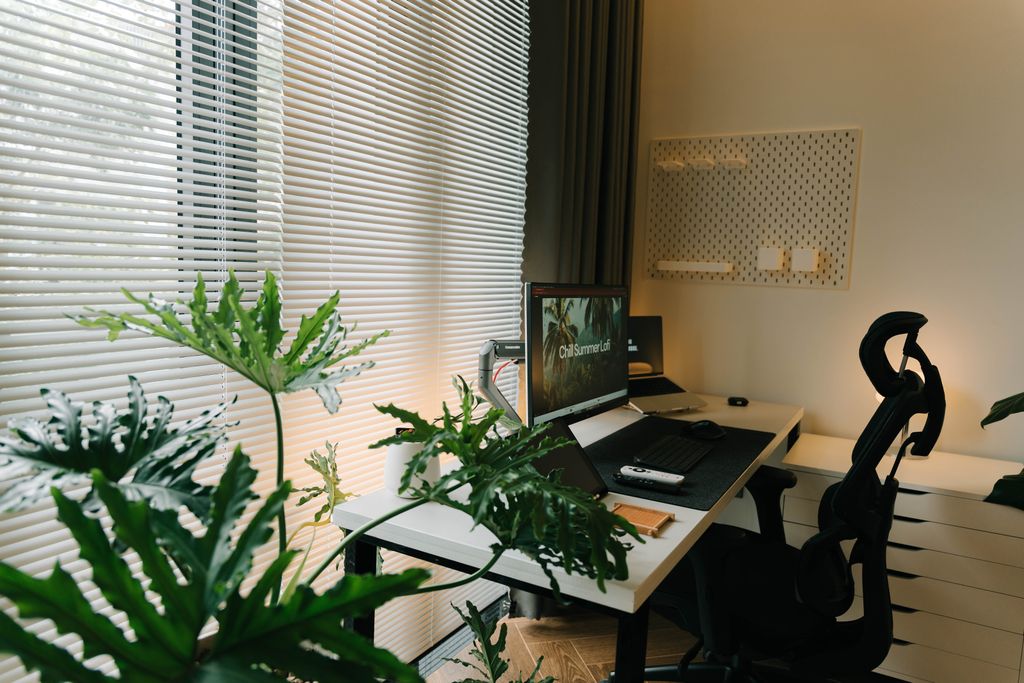
A sturdy and functional desk is another essential for a budget home office. Look for a desk that is spacious enough to accommodate your computer, paperwork, and any other equipment you need. Consider opting for a desk with built-in storage options, such as drawers or shelves, to keep your workspace organized and clutter-free. If buying a new desk isn’t within your budget, consider repurposing an old table or desk that you already have. With a fresh coat of paint or some creative modifications, you can transform it into a functional workspace.
Proper Lighting
Good lighting is crucial for a productive work environment. Natural light is ideal, so try to position your workspace near a window. However, if that’s not possible, invest in a good desk lamp that provides bright, focused lighting. LED desk lamps are energy-efficient and can be found at affordable prices. Proper lighting not only reduces eye strain but also helps create a positive and inviting atmosphere in your home office.
Organizational Tools
Keeping your workspace organized is essential for productivity. Invest in some budget-friendly organizational tools, such as file folders, desk organizers, and storage bins, to keep your documents and supplies in order. Utilize wall space by installing shelves or hanging organizers to maximize storage options without taking up valuable desk space. With a well-organized workspace, you’ll be able to find what you need quickly, reducing distractions and increasing efficiency.
Reliable Technology
A budget home office should be equipped with reliable technology that allows you to work efficiently. This includes a reliable computer or laptop, a fast internet connection, and a printer/scanner. Consider purchasing refurbished or second-hand electronics to save money. Many manufacturers offer refurbished options that come with warranties and are tested to meet high-quality standards. Additionally, explore affordable internet plans that meet your needs without breaking the bank.
Comfortable Ergonomics
Creating a comfortable and ergonomic workspace is essential for long hours of work. Invest in a keyboard and mouse that are comfortable to use and promote good posture. Consider using a monitor stand or adjustable laptop stand to position your screen at eye level, reducing strain on your neck and shoulders. These small investments in ergonomics can go a long way in preventing discomfort and promoting productivity.
Personal Touches
While a budget home office focuses on functionality and affordability, it’s important to add some personal touches to make it feel like your own. Hang some artwork or inspirational quotes that motivate you. Add some plants to bring life and freshness to your workspace. Personalizing your home office not only makes it more inviting but also helps create a positive and inspiring environment.
In conclusion, setting up a budget home office doesn’t mean sacrificing comfort or functionality. By investing in essentials such as comfortable seating, a functional desk, proper lighting, organizational tools, reliable technology, comfortable ergonomics, and adding personal touches, you can create a productive and inviting workspace without breaking the bank. With a little creativity and smart choices, you can transform any corner of your home into a budget-friendly home office that meets your needs.
Frequently Asked Questions (FAQ)
What are the essential items for a budget home office?
The basic essentials include a comfortable chair, a functional desk, a reliable computer or laptop, a stable internet connection, good lighting, and a few organizational accessories. As your needs grow, you can gradually add items like a printer, monitor, or ergonomic accessories.
How much does it cost to set up a budget home office?
A simple home office can often be set up for $300–$800, depending on the equipment you already own. Buying refurbished electronics, shopping during sales, and repurposing existing furniture can reduce costs significantly.
Is an ergonomic chair worth the investment?
Yes. An ergonomic chair provides better support for your back, neck, and posture, making it one of the best long-term investments for anyone who works from home regularly. Even budget-friendly ergonomic chairs can improve comfort during long workdays.
Can I use my dining table as a desk?
Absolutely. If you’re on a tight budget, a dining table or sturdy existing desk can work well. Just make sure the height is comfortable and pair it with a supportive chair to maintain good posture.
What type of lighting is best for a home office?
Natural daylight is ideal whenever possible. If your workspace lacks natural light, use an adjustable LED desk lamp with daylight or neutral white lighting to reduce eye strain and improve productivity.
Do I need a printer for a home office?
Not necessarily. Many professionals work entirely digitally using cloud storage, e-signatures, and PDF documents. If you only print occasionally, using a local print shop may be more cost-effective than owning a printer.
How to Optimize Your Home Network?
How can I keep my home office organized on a budget?
Use inexpensive storage solutions such as desk organizers, file folders, floating shelves, storage boxes, and cable management clips. Decluttering your workspace regularly also helps maintain productivity without additional expense.
Is buying refurbished office equipment a good idea?
Yes. Refurbished laptops, monitors, and printers from reputable manufacturers or certified retailers can offer excellent performance at significantly lower prices. Always check the warranty and return policy before purchasing.
What internet speed is recommended for working from home?
For most remote workers, a connection of 50–100 Mbps is sufficient for video conferencing, cloud applications, and everyday tasks. If multiple people share your internet connection or you frequently upload large files, faster speeds may be beneficial.
How can I improve productivity in a small home office?
Keep only essential items on your desk, position your monitor at eye level, minimize distractions, maximize natural light, and use storage solutions to reduce clutter. Even a small, organized workspace can be highly productive when designed efficiently.